Export IPC-2581 from Siemens (Mentor) pads
How to export an IPC-2581 file from Siemens (Mentor) Pads and upload it for a quote on CircuitHub.
If you're a Siemens (Mentor) Pads user, you can easily export to IPC2581B, which can then be uploaded for a quote on CircuitHub.
-
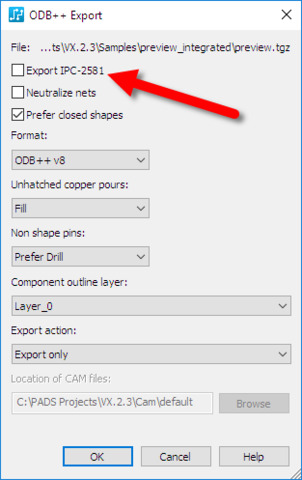
From the File > Export, select the ODB++ export format and click Save.
-
On the ODB++ export dialog, you can check the box for IPC2581.
-
The XML file in the IPC2581 format will be created alongside the .tgz for the ODB++.
-
Review this article on how to upload your IPC-2581 file to CircuitHub.