

Supplying a BOM as a CSV / spreadsheet
This article describes the support for a separate BOM to supplement EDA data.
If you want to provide more data related to the bill of materials (BOM) than what is extracted from the EDA files, or if you want to exercise finer control over the BOM, then you can upload a standalone BOM in CSV format along with your EDA files.
You can use the CSV BOM to:
- Provide additional information, e.g. for sourcing, related to part placements extracted from the EDA files.
- Control how part placements are grouped into BOM lines.
- Control the DNF/DNP status of part placements.
For related preparation guidance, see Specifying part numbers in EDA tools and Multi-part footprints. Altium users can also review Auto-detection of DNP parts.
Most spreadsheet programs like MS Excel or LibreOffice Calc can export a single sheet in CSV format and many other tools can export data in CSV format, which stands for comma separated values and is described by RFC 4180. Even though the name implies that the column separator is "," we support using TAB or ";" as the separator as well.
Here is an example of what a CSV BOM might look like (as a google sheet):
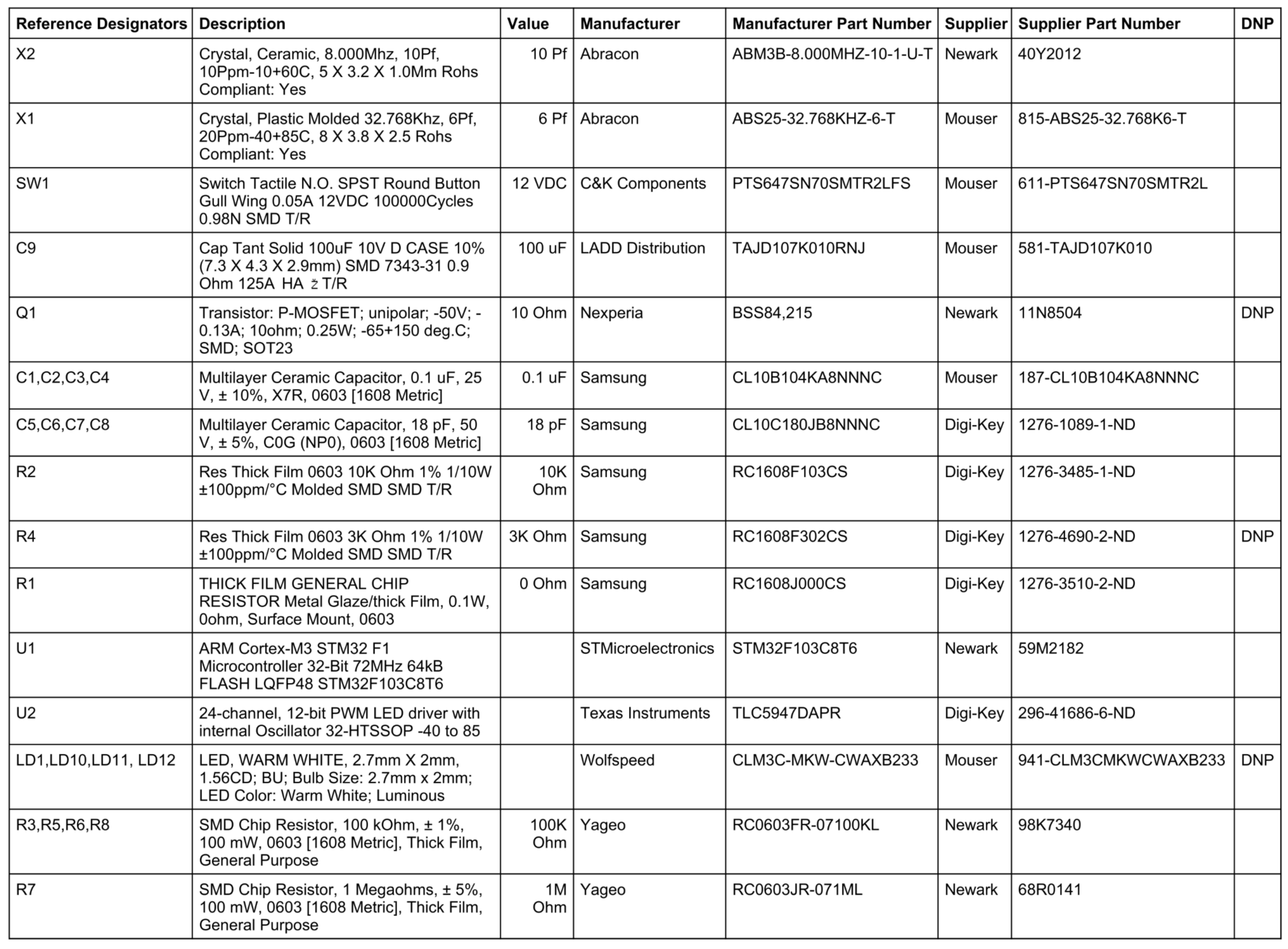
Not all the columns are required and we try to be flexible in how the columns are named, but at a minimum we require a Reference Designators column to associate a single BOM line in the CSV BOM with one or more part placements on the board, and a Manufacturer Part Number column.
See below for a description of the columns, how they are interpreted and how they can be named.
Options controlling how a BOM effects a project
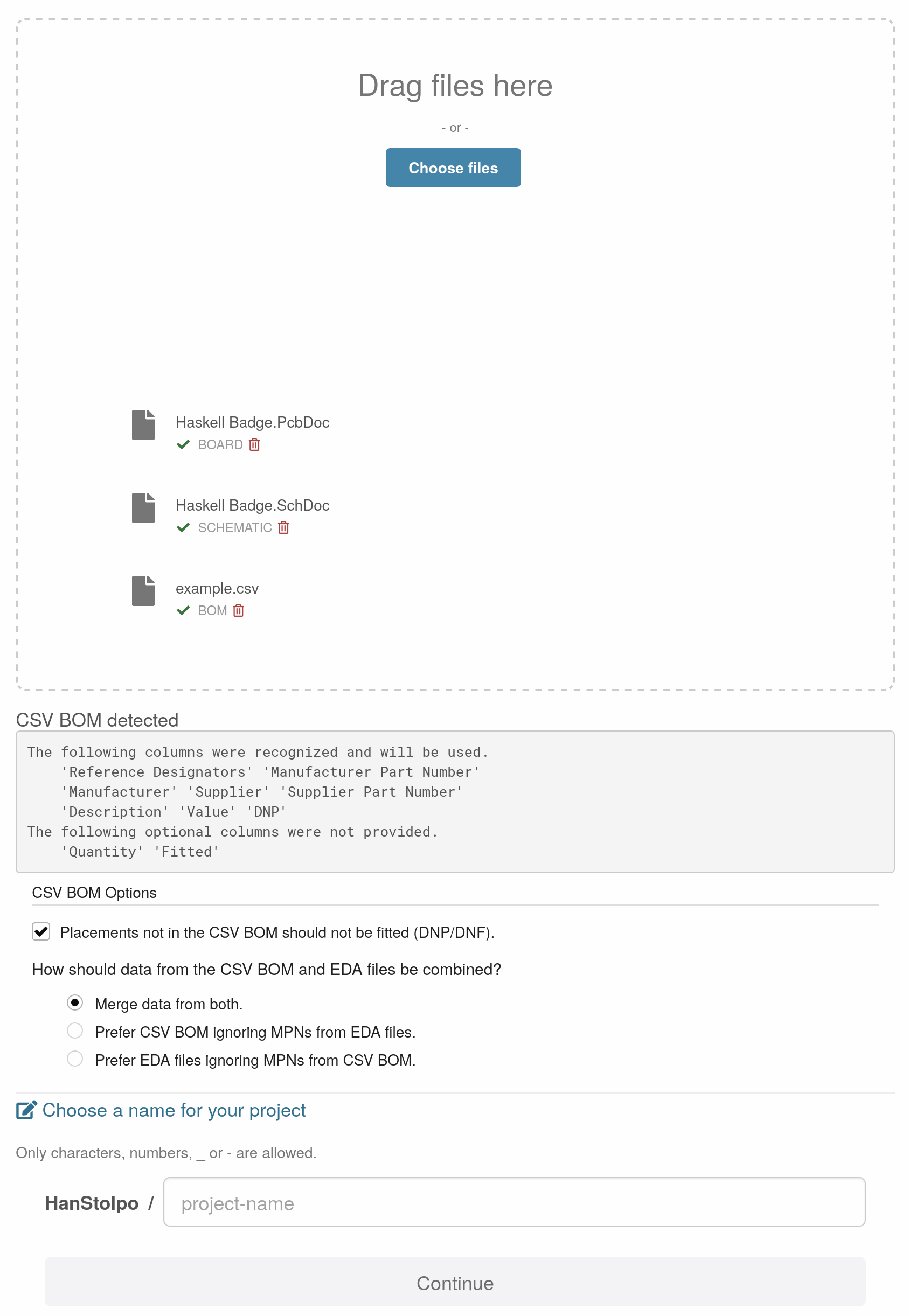
When you provide a CSV BOM that is understood by CircuitHub you will be presented with a set of option allowing you to decide how the data from the CSV BOM and the EDA files should be combined.
Controlling DNP/DNF
If you select the checkbox for Placements not in the CSV BOM should not be fitted (DNP/DNF), then any placements extracted from the EDA files which do not match any of the BOM lines in the CSV BOM will not be placed on the board, they will not be furnished, irrespective of the DNP / DNF status that may have been extracted from the EDA files.
Deciding how CSV and EDA data should be combined
Normally the part data from the EDA files and the CSV BOM would be combined and data from both would be taken into account when auto reconciliation takes place to decide which part to purchase. You can override the default behavior to either prefer data from the CSV BOM and ignore MPNs from the EDA files or to prefer data from the EDA files and ignore MPNs from the CSV BOM.
Columns
Reference Designators (Required)
This column is required and associates a single BOM line in the CSV BOM with one or more placements on the board.
The content of the column is one or more reference designators, if there are multiple then they should be separated by a comma, and they should match the names of reference designators associated with parts placed on the board. You can also specify a range of designator by writing a dash between the lower and upper bound of the inclusive range.
Here are some examples of valid reference designators:
- A single reference designator.
R1
- Multiple reference designators.
C1,C2,C9
- A range of designators from C1 to C4.
C1-C4
Recognized column names
The following column names can be used to identify this column.
designator, reference, references, position, ref des, ref designator, reference designators, referenceDesignators, reference designator, reference(s), referencedesignators, refdes, partsDescription (Optional)
This column is optional and can be used to provide a description of the component / part.
The description of the part is helpful during auto reconciliation when the part to purchase is determined and also when sourcing issues arise to suggest alternate substitutes for the part.
Recognized column names
The following column names can be used to identify this column.
description, part descriptionValue (Optional)
This column is optional and can be used provide the value associated with a component / part, e.g. the resistance value of a resistor or the capacitance value of capacitor.
The value associated with the component is helpful during auto reconciliation when a part to purchase is determined and also when sourcing issues arise to suggest alternate substitutes for the part.
This is especially useful for simple parts like resistors or capacitors where an exact match to a part based on MPN does not matter and where any part meeting the required characteristics is acceptable.
Recognized column names
The following column names can be used to identify this column.
value, part value, component valueManufacturer (Optional)
This column is optional and provides the manufacturer of the component / part.
Recognized column names
The following column names can be used to identify this column.
manufacturer, manufacturer 1, mfg, manufacturor, manufacturer_1, manufacturer_nameManufacturer Part Number (Required)
This column is required and provides the manufacturer part number of the component / part.
If an MPN is provided and unambiguously matches a part then during auto reconciliation the specified part will be associated with the BOM line and associated part placements.
Recognized column names
The following column names can be used to identify this column.
manufacturer p/n, manufacturer part number, manufacturer part number 1, manufacturerpartnumber, manufacturer part #, part number, partnumber, mpn, designation, manufacturer_pn, manufacturer pn, mfg pn, pn, manufacturer_1_part_number, lcsc part #, manufacturer_part_number, mfr part number, mfg p/n, mfg part #Supplier (Optional)
This column is optional and provides the supplier of the component / part.
Recognized column names
The following column names can be used to identify this column.
supplier, supplier 1, vendor, distributorSupplier Part Number (Optional)
This column is optional and provides the supplier part number of the component / part.
If an SPN is provided and unambiguously matches a part then during auto reconciliation the specified part will be associated with the BOM line and associated part placements.
Recognized column names
The following column names can be used to identify this column.
supplier p/n, supplier part number, supplier part number 1, digikey part, vendor part number, s1 part number, distributor part number, dpnDNP (Optional)
The DNP column can be used to control whether the placements associated with a specific CSV BOM line should be placed on the board or not, whether they should be furnished or not.
If the column is empty or contains one of the following, fit, fitted or placed, then the parts will be placed / furnished.
If the column contains one of the following, don't fit, do not fit, not fitted, do not place, not placed, dnp or dnf, then the parts will not be placed / furnished.
See also the description of the Fitted column which is similar to the DNP column.
Recognized column names
The following column names can be used to identify this column.
dnpFitted (Optional)
The Fitted column is similar to the DNP except some values are interpreted differently. If both a Fitted and a DNP column are present then the Fitted column takes precedence.
If the column contains one of the following, yes, fit, fitted or placed, then the parts will be placed / furnished.
If the column contains one of the following, no, don't fit, do not fit, not fitted, do not place, not placed, dnp or dnf, then the parts will not be placed / furnished.
Recognized column names
The following column names can be used to identify this column.
fitted